If you told me a few years ago that I’d be using a $110 mini PC as the brain of my home theater setup, I would’ve probably laughed—and then asked where you got it because that’s a pretty sweet deal. But fast forward to today, and here I am, proudly showing off my little N100 Mini PC-turned-HTPC (Home Theater PC) to anyone who will listen. And the best part? It didn’t cost me a small fortune, it’s low on power consumption, and it’s surprisingly sleek and portable. Let’s dive into the journey that turned a budget-friendly piece of hardware into my entertainment hub.
Why I Chose the N100 Mini PC
Let’s be real here—there are countless streaming options available. Between the likes of Google Chromecast, Amazon Fire Stick, Roku, and even smart TVs, we’re spoiled for choice when it comes to affordable, plug-and-play solutions. So why on earth did I go for the N100 Mini PC instead?

1. Price
At just $110, the N100 Mini PC hits that sweet spot between affordability and performance. Sure, it’s not dirt cheap like some streaming sticks, but you get a lot more bang for your buck. I mean, this thing is a fully functional PC! Compare that to Chromecast or Firestick, which do their job well but are limited to streaming services, and you’ll quickly see why the N100 Mini PC was calling my name. I love the fact that I’m not just restricted to streaming apps—I can run full desktop apps, browse the web, or even throw on a little light gaming session when I feel like it.
Please note – I bought the N100 Mini PC during last year’s Black Friday sale. Currently these Mini PCs are going on sale for around $130 unless you can hold out for a major event. I personally recommend getting yourself a GMKtec N100 Mini PC, which go on sale sub-$130 on Amazon frequently.
2. Low Power Consumption
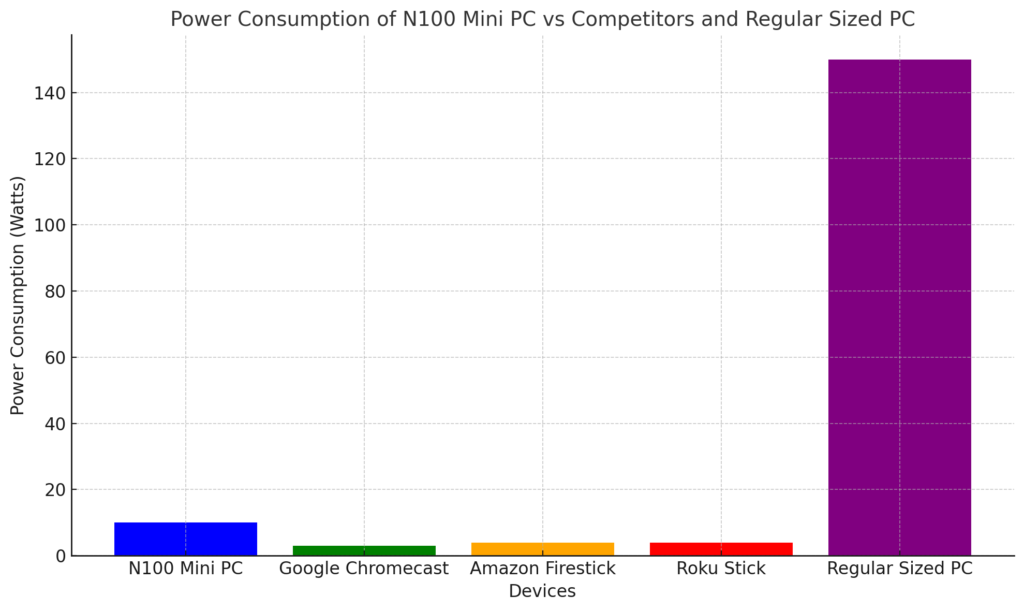
If you’re setting up a home theater, you don’t want a power-hungry device sucking up electricity 24/7. This is where the N100 Mini PC shines. Unlike full-sized PCs or gaming consoles, this mini PC sips power like it’s drinking tea at a fancy British garden party. Even when running all day, it consumes way less power than the average desktop, making it a more eco-friendly (and wallet-friendly) choice.
Please see below for a bar graph showing the power consumption of the N100 CPU mini PC versus competitive options and full sized desktop. Please note that your power consumptions may vary due to multiple factors so do your own research on this as well.
3. Portability and Size
When I say this thing is small, I mean it’s small. We’re talking palm-sized, pocketable, take-it-anywhere levels of compact. Whether I’m moving between rooms, taking it to a friend’s house for a movie night, or just tucking it behind my TV to keep things neat, the N100’s portability is a huge win. And while Chromecast and Firestick are even smaller, they don’t come with the versatility that a mini PC provides (more on that later).
4. Good Looks
OK, I know “looks” aren’t everything, but have you seen some of the bulky, ugly tech out there? The N100 Mini PC is sleek, modern, and doesn’t look out of place next to my TV or sound system. Plus, there’s something about its minimalist design that just works. You won’t catch me hiding this little beauty behind my TV unless I’m trying to show off its stealthy, inconspicuous size.
Why Not Just Use Chromecast or Firestick?
Now, before you accuse me of being a tech hipster, let me be clear: I’m a fan of Chromecast and Firestick for their simplicity. They’re great for streaming your Netflix, Disney+, and YouTube without fuss. However, when I wanted to build something more customizable and versatile, those streaming sticks just didn’t cut it for me. Here’s why:
1. Full PC Experience
With a Chromecast or Firestick, you’re limited to the apps and services that they offer. Sure, they cover the basics like streaming and screen mirroring, but if you want to do more—like run custom media software, access local files directly, or browse the web with full desktop functionality—you’re out of luck. With the N100 Mini PC, I’ve got an entire PC at my fingertips. Want to play retro games using an emulator? No problem. Need to manage my media library on an external drive? Easy. There’s no limit to what I can do with this little powerhouse.
2. Customization Options
When you’re using a mini PC like the N100, you have full control over how you set it up. Unlike Chromecast or Firestick, where you’re locked into the manufacturer’s ecosystem, the N100 Mini PC lets you choose everything—from the operating system to the software. This brings me to my next point: setting up the right OS.
Setting Up the N100 Mini PC as an HTPC
One of the most fun (and admittedly nerdy) parts of turning the N100 Mini PC into an HTPC was deciding how to set it up. There are a few options here depending on what you’re looking for, but here’s what worked for me.
1. Kodi: The Ultimate Media Center
If you’re into home theater setups, you’ve probably heard of Kodi. It’s a free, open-source media player that transforms your PC into a media hub capable of handling pretty much anything you throw at it. Whether it’s streaming from your favorite services, accessing local media, or even installing add-ons for extra functionality, Kodi is a solid choice.

With my N100 Mini PC, I installed Kodi on top of Windows 10. The setup process was quick, and soon enough, I was navigating through my media library like a pro. The interface is customizable, so if you want to tweak the appearance or add extra features, you can. Kodi made my N100 feel like a legit home theater powerhouse, complete with a sleek GUI and easy-to-use controls.
2. Windows 10/11 for Familiarity
While Kodi is great for media, sometimes I just wanted a full PC experience. This is where the versatility of Windows came into play. I installed Windows 10, and now I can easily switch between a media center setup and regular PC tasks. Whether I’m using a Bluetooth keyboard to surf the web, checking email, or even working on a project while the rest of the family watches a movie, the N100 Mini PC doubles as a home office in a pinch.
For those who want the latest features, Windows 11 is also an option. The clean, modern interface looks great on a big screen, and with its optimized performance, the N100 Mini PC handles it like a champ. Plus, you can customize the desktop experience to feel more like a TV interface if you prefer that. There are tons of third-party software solutions that let you create a custom media interface on top of Windows.
3. Custom Media Software
If Kodi isn’t your thing and you want something a little more tailored, there are other media software options. I dabbled with Plex, which is perfect for organizing and streaming my personal media collection. With Plex, I could access all my movies, TV shows, music, and photos from anywhere, including my phone. The N100 Mini PC worked beautifully as a Plex server, allowing me to stream my content at home or on the go.
Alternatively, Emby is another option that works similarly to Plex, offering a great user interface and easy access to your media library. I liked how both Plex and Emby provided smooth playback and a seamless experience, whether I was watching a 4K movie or a TV show on my couch.
Benefits of the N100 Mini PC as an HTPC
So, why did I ultimately choose the N100 Mini PC over a typical streaming stick? Let’s break down the benefits:
- Versatility: The N100 Mini PC isn’t just a streaming device—it’s a full-fledged computer. You can install any OS, run any software, and customize it to your heart’s content. Whether it’s Kodi, Plex, or simply browsing the web, the possibilities are endless.
- Power Efficiency: Unlike gaming PCs or larger desktops, the N100 sips power while delivering impressive performance. You won’t need to worry about skyrocketing electricity bills.
- Portability: Thanks to its small size, I can easily take it anywhere, whether it’s to a friend’s house for movie night or just relocating it to another room in my house.
- Aesthetics: The N100 Mini PC looks sleek and modern, so it won’t be an eyesore in your living room setup. Trust me, this is the kind of tech that you don’t mind showing off.
- Customization: With a mini PC, you’re not locked into one manufacturer’s ecosystem. You can install whatever OS or software you like, making it far more flexible than a Chromecast or Firestick.
Final Thoughts
In the end, the N100 Mini PC exceeded my expectations for a budget-friendly home theater setup. For just $110, I got a sleek, powerful, and versatile device that could handle all my media needs and then some. While Chromecast and Firestick are great for those who want simple, out-of-the-box solutions, there’s something satisfying about customizing your own HTPC from scratch. If you’re looking for a fun project that will upgrade your entertainment system, I can’t recommend the N100 Mini PC enough.
Trust me, once you’ve experienced the full potential of a mini PC, you won’t want to go back!